Upgrade
An upgrade is one changed line in the .env and a docker compose up -d. The container migrates the database before it answers requests, and /health says when it is done.
What holds
- Heinzel Pro follows semantic versioning. Patch and minor releases (2.67.0 to 2.68.2) are upgraded in place. A major release names manual steps in the changelog.
- The version stands in the
.env. The image taglatestis never used; apullcannot be an upgrade by accident. - Migrations are additive and idempotent and run at start, before the first answer. New settings get defaults.
- A command that was running on a server during the restart runs on there as a job; the new release fetches its result. Sessions carry on where they were.
- A release runs beside its predecessor on the same database, from one to the next; the way without interruption below needs that.
The ordinary upgrade
On the example of 2.67.0 to 2.68.2, on a host set up by the installation guide.
Read the notes for the target version. A release's changelog names what changes for users; a section "Upgrade to x.y" names what to do beforehand. Usually nothing.
Back up. The database and the
.env, both into a directory off the host.$ cd /opt/heinzel-pro $ sudo docker compose exec -T db pg_dump -U heinzel -Fc heinzel_pro \ > /var/backups/heinzel-pro/before-2.68.2.dump $ sudo cp .env /var/backups/heinzel-pro/env-before-2.68.2Change the version.
$ sudo sed -i 's/^HEINZEL_VERSION=.*/HEINZEL_VERSION=2.68.2/' .env
$ grep HEINZEL_VERSION .env
Fetch the image before anything stops. If the version does not exist, this step fails and nothing has changed.
$ sudo docker compose pull appWarn the people. With
HEINZEL_OPS_TOKENin the.env, Heinzel Pro tells everybody at work that a restart is coming and waits for a quiet minute. See Announcing a restart. Without the token the step is skipped; then it is about thirty seconds in which no page answers, and whoever is typing loses half a message.Restart.
$ sudo docker compose up -dCheck. Only then is the upgrade done.
$ curl -s http://127.0.0.1:4000/health
{"database":"ok","pending_migrations":0,"rules_version":"3.3.1","status":"ok","version":"2.68.2"}
The version is the new one,
pending_migrationsis 0. In the application it stands under Installation, Log and at the bottom right of every page.Tidy up. The previous image stays for a step back; older ones can go.
$ sudo docker image ls ghcr.io/wintermeyer/heinzel-pro
$ sudo docker image rm ghcr.io/wintermeyer/heinzel-pro:2.66.0
Announcing a restart
A restart interrupts whoever is at work. POST /ops/drain with a deadline in seconds (900 at most) and a reason tells everybody: every open page shows a banner with the latest moment, and Heinzel waits for a quiet minute in which no session is in the middle of a step, nobody is typing and no schedule is due. Then the banner counts down half a minute in which nothing new starts, and GET /ops/drain reports ready. If no page is open and nothing runs, ready comes at once.
The address answers the host itself only: over the loopback address, with Authorization: Bearer <HEINZEL_OPS_TOKEN> and without forwarding headers. From outside it gets a 404, and the proxy from the installation guide does not let it through in the first place. From inside the container:
# Announce: in ten minutes at the latest, with the reason for the banner
$ sudo docker compose exec app sh -c '
  curl -s -X POST -H "Authorization: Bearer $HEINZEL_OPS_TOKEN" \
    -H "Content-Type: application/json" \
    -d "{\"in\": 600, \"reason\": \"Upgrade to 2.68.2\"}" \
    http://127.0.0.1:4000/ops/drain'
{"deadline":"2026-10-25T10:12:00Z","people":2,"ready":false,"running_sessions":1,…}

# Ask until ready is true
$ sudo docker compose exec app sh -c '
  curl -s -H "Authorization: Bearer $HEINZEL_OPS_TOKEN" http://127.0.0.1:4000/ops/drain'
{"deadline":"2026-10-25T10:12:00Z","people":0,"ready":true,"running_sessions":0,…}

# Take it back if the upgrade does not happen after all
$ sudo docker compose exec app sh -c '
  curl -s -X DELETE -H "Authorization: Bearer $HEINZEL_OPS_TOKEN" http://127.0.0.1:4000/ops/drain'
An administrator of the installation can take the announcement back at the banner or start the countdown at once. The release brings the script heinzel-pro-drain in deploy/hosted/, which asks and waits, and a systemd unit that runs it before the host shuts down, such as for the reboot after unattended-upgrades.
One script for all of it
The steps above as a script that takes a version, fetches the image first, warns the people and only then restarts, and that ends with an error if the new release does not answer within two minutes. It is a shortened version of deploy/hosted/deploy.sh from the release.
#!/bin/sh
# upgrade.sh <version>: bring Heinzel Pro in /opt/heinzel-pro to a version.
set -eu
version=${1:?usage: upgrade.sh <version>}
cd /opt/heinzel-pro

printf '%s\n' "$version" | grep -Eq '^[0-9]+\.[0-9]+\.[0-9]+$' ||
  { echo "Not a version: $version" >&2; exit 2; }

before=$(sed -n 's/^HEINZEL_VERSION=//p' .env)
sed -i "s/^HEINZEL_VERSION=.*/HEINZEL_VERSION=$version/" .env

# Fetch first: nobody is warned for an image that does not exist.
if ! docker compose pull app; then
  sed -i "s/^HEINZEL_VERSION=.*/HEINZEL_VERSION=$before/" .env
  echo "The image of $version could not be fetched; nothing changed." >&2
  exit 1
fi

# Warn and wait for a quiet minute, ten minutes at the latest.
drain() {
  docker compose exec -T app sh -c '
    curl -fsS -m 10 -X "$1" -H "Authorization: Bearer $HEINZEL_OPS_TOKEN" \
      -H "Content-Type: application/json" ${2:+-d "$2"} \
      http://127.0.0.1:4000/ops/drain' sh "$1" "${2:-}"
}
answer=$(drain POST "{\"in\": 600, \"reason\": \"Upgrade to $version\"}") || answer=
deadline=$(( $(date +%s) + 630 ))
until case "$answer" in *'"ready":true'*) true ;; *) false ;; esac; do
  [ "$(date +%s)" -lt "$deadline" ] || break
  sleep 5
  answer=$(drain GET) || break
done

docker compose up -d

# Done when the new version answers and no migration is pending.
for _ in $(seq 60); do
  health=$(docker compose exec -T app sh -c \
    'curl -fsS -m 5 http://127.0.0.1:4000/health' 2>/dev/null) || health=
  case "$health" in *"\"version\":\"$version\""*)
    case "$health" in *'"pending_migrations":0'*) echo "$health"; exit 0 ;; esac
  esac
  sleep 2
done
echo "Heinzel Pro $version did not come up within two minutes." >&2
docker compose ps app >&2
exit 1
$ sudo sh upgrade.sh 2.68.2Going back
A step back is the same line with the older number and docker compose up -d. If the new release brought migrations the old code cannot run with, take those back first; the changelog names the timestamp:
$ sudo docker compose run --rm app bin/heinzel_pro eval \
  'HeinzelPro.Release.rollback(HeinzelPro.Repo, 20261011104222)'
$ sudo sed -i 's/^HEINZEL_VERSION=.*/HEINZEL_VERSION=2.67.0/' .env
$ sudo docker compose up -d
The alternative is restoring the backup from before the upgrade (see Operations, Restoring). A migration that cannot be taken back says so in the changelog; then the backup is the way.
Without interruption: two slots
An upgrade of the one container is half a minute in which no page answers. With two slots the new release starts beside the old one, the proxy switches as soon as it is healthy, and the old one stops after its people were warned. The release holds what belongs to it in deploy/hosted/: docker-compose.slots.yml with the services blue and green on the host's network on ports 4000 and 4001, nginx-upstream.conf and deploy-slots.sh, which runs the steps in order.
What the script does:
- Fetch the image of the new version.
- Start the free slot with it and wait until its
/healthnames the new version withpending_migrations0. The migration runs while the old slot keeps serving. - Write nginx's upstream line to the new slot and reload nginx. New connections land at the new release.
- Announce the restart to the old slot and wait for
ready. Its open pages reconnect, to the new slot. - Stop the old slot.
Two releases share the database for these minutes. Three things keep them apart, and the .env needs more for that:
| Variable | Purpose |
|---|---|
HEINZEL_NODE_ID | Name of the slot (blue, green). A session is run by one of the two; a slot that stops gives its sessions back, one that crashes loses them to the other after thirty seconds. |
HEINZEL_NODE_ADDRESS, HEINZEL_CLUSTER_NODES | A loopback address per slot (127.0.0.1, 127.0.0.2) and both nodes, so that a page on the new slot sees what a runner on the old one does. |
HEINZEL_CLUSTER_COOKIE | openssl rand -hex 32, the same for both. Whoever knows the cookie runs code in the node; so a slot without a cookie of its own does not start. |
HEINZEL_LISTEN=loopback | On the host's network the release would listen on every interface; this way only on the host. |
HEINZEL_DIST_PORT | Port the nodes talk over, default 4370. |
The slots' compose file sets all of that except the cookie and the ops token. Two limits: the VPN ports can be bound only once, the new slot waits until the old one lets them go, and a tunnel is interrupted that long. And running side by side holds from one release to the next; whoever skips releases does an upgrade with a stop in between.
The rule set, apart from the release
The Heinzel rules are data: a new rule version needs no new image and no restart. The image brings a rule set along, and every hour the installation asks the public Heinzel repository and takes over the newest release of the same major version. A new major version waits until an administrator of the installation takes it over under Installation, Settings, Rule set, because major versions move rules between Heinzel and Heinzel Pro.
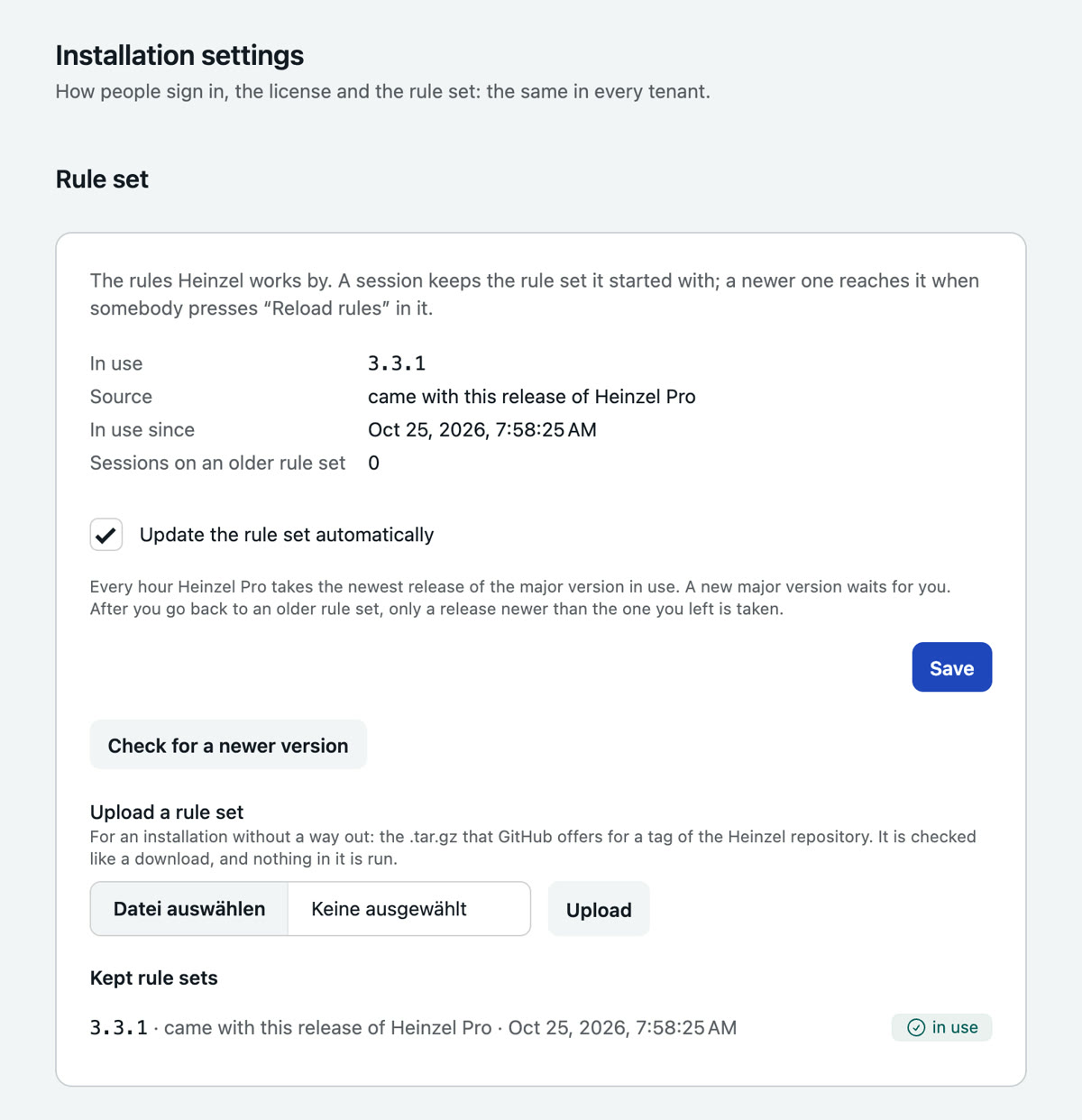
- A session keeps the rule set it started with; its menu offers "Reload rules" as soon as a newer one applies.
- Without internet you upload the
.tar.gzof a tag ofgithub.com/wintermeyer/heinzel. It is taken only if it is what it says; nothing in it is executed. - One version back is a click in the list; after that only a release newer than the one left is taken over.
HEINZEL_RULES_DIRstands above all of it: a mounted directory is the rule set, and the page offers no update.- Every update and every failure stands in the installation's log.
Coming from further back
Some older steps needed manual work, and their sections are in the changelog. The ones people trip over:
- 2.10: no more sudo password. Give every Heinzel user
NOPASSWDfirst or use root. - 2.24:
HEINZEL_VERSIONbecomes required; without the line Compose does not start. - 2.29: servers have no group any more; the CSV for the import reads
hostname,port,user,description, and a policy file that names a group is refused, so export anew. - 2.30: sign-in moved to
/auth/login; adjust monitors and proxy rules for/users/log-in, the old addresses redirect. - 2.51.1: removes two columns nobody has read since 2.50; a rollback afterwards goes back to 2.51.0, no further.
Older steps in detail
The sections of the steps that needed manual work, as they were written at the time.
Upgrading to 2.0 (tenants)
2.0 moves everything an installation holds into one tenant, named after the organization name from the settings (or "Default"). Nothing changes in daily use until a second tenant is created.
- Every user keeps their role as a member of that tenant. Administrators also become administrators of the installation; review the list under Installation, Accounts if not all of them should create tenants and change sign-in rules.
- Sign-out after idle time, password login, mandatory two-factor and single sign-on move from General to the new Sign-in tab.
- Signing in is recorded for the installation from now on, so the audit log of a tenant no longer lists logins; its administrators of the installation see them. The audit export numbers events per tenant.
- The login page shows "Heinzel Pro" in place of the organization name, which now belongs to a tenant.
- Everybody is signed out once, because the session cookie is now encrypted. "Remember me" signs back in by itself.
- The two migrations (
20261008094017,20261008095012) rewrite every row of the larger tables once, under a lock: expect a pause that grows with the number of messages and audit events. They need PostgreSQL 15 or later (the compose file ships 17) and cannot be rolled back. Take the database backup before the upgrade and restore it to go back to 1.x.
Upgrading to 2.1 (several model providers)
The model a tenant had configured becomes its first provider, the default
one, open to every member and named after the model. Nothing changes in use
until a second provider is added. Migration 20261008120857 moves the
configuration out of the settings and cannot be rolled back; take the
database backup first. Migration 20261008122252 adds prices and costs.
Sessions from before the upgrade show their model and tokens, but no
cost.
Upgrading to 2.3 (autonomy levels)
The two approval modes become three levels. "Always ask" is "Ask for
everything"; "read-only automatically" is "Reading alone", for the tenant and
for each server that had the box ticked. Every tenant's ceiling starts at
"Reading alone", so nothing runs after the upgrade that did not run before;
an administrator of the installation raises it under Installation, Tenants. Migration
20261008124115 cannot be rolled back.
Upgrading to 2.4 (sharing)
Sessions that exist stay open to every member, for reading and writing, as before, and the tenant's default for new ones is set to the same. To make new sessions private, change it under Settings, Policy. Links for people without an account are off until an administrator allows them.
Upgrading to 2.6 (tenants on shared hosts)
In an installation with one tenant, servers keep leaving handover notes in the system journal as before. With several tenants no server does until its tenant ticks the box in the server form. Keys already installed on hosts keep the comment they were installed with; a shared key created before 2.6 carries its name there until it is rotated.
Upgrading to 2.7 (providers with several models)
Each model provider that exists becomes a provider with one model, under the same name and with the same key. To put several models under one key, open the provider, tick the others, and remove the providers that are then duplicates. While a deploy switches over, the release before this one cannot add a provider; everything else goes on working.
Upgrading past 2.7 (your proxies)
The address of a request is now taken from what your own reverse proxy
reports, not from what a client sends. Behind the one proxy the installation
guide describes nothing is to do. Behind two (a load balancer and a proxy)
set TRUSTED_PROXIES=2, or the sign-in limit counts every visitor as the
load balancer. The command timeout the agent may ask for defaults to
3600 s (Settings, Policy).
Every tenant stays on UTC, as before. Choose the time zone under Settings, General; from then on a schedule's "0 9 *" is nine in the morning there, so check the times of existing schedules after choosing.
Accounts that already use two-factor sign-in have no recovery codes yet. Each person makes them once under Account, "New recovery codes".
The migrations of this step add tables and columns and rewrite no existing row, so they run in moments. What you will see afterwards:
- Sessions, Review lists every finished session in which a changing command ran without an approval, older ones included, until somebody who had no part in it signs it. The dashboard counts them.
- The approvals page shows what scheduled runs skipped during the last week.
- The second approval of a destructive command asks for a sign-in no older than five minutes.
- The servers list shows system, disk and uptime for a host after its next connection test.
- Four notification events are new and off: an approval that waited too long, autonomy raised on a server, the model budget at 80 %, the weekly mail. Switch on what you want under Settings, Alerts.
- No server has maintenance windows, no tenant a budget, a block list or standing approvals until you set them.
Upgrading to 2.9 (VPN connections)
The image ships the helpers wireproxy, tailscaled and tailscale. For a
tenant's side to dial in, the installation needs open UDP ports: copy the
line under ports from the new docker-compose.yml into yours, check with
ss -lun that nothing on the host listens on 51900 to 51919/udp (the
container does not start otherwise), and open the range in the host's
firewall, see installation.md. Without that such a connection stays on
"waiting for the other side". Connections Heinzel Pro dials itself, and
those into a Tailscale network, need the way out only. The migrations add a
table and a column and rewrite no existing row.
Upgrading to 2.10 (no sudo password)
Heinzel Pro no longer keeps a sudo password for a host. Before the upgrade,
give Heinzel's user sudo without a password (NOPASSWD) on every host where
one was typed into the server form, or let Heinzel log in as root there.
Otherwise commands with sudo fail on these hosts after the upgrade.
The migration (20261010152508) removes the column and with it the passwords
that were kept. A rollback brings the column back empty.
Upgrading to 2.17 (sessions in the database)
The tables and columns of a session are named after it: conversations is
sessions, conversation_id is session_id. The migration (20261010185251)
only renames, so it takes a moment whatever the size, and a rollback renames
back. The rights of your people and the jobs that wait move with it.
Three names change where something outside reads them. The alert webhook
sends session_id with a command. A policy file calls the setting
session_sharing; a file exported before the upgrade leaves it untouched on
import, so export anew. And queries of your own against the database need the
new names. The audit log and its export keep theirs (conversation.created,
conversation_id): what was written stays as it was written.
Upgrading to 2.18 (the tenant in the address)
Every address inside a tenant begins with the tenant's slug:
/acme/sessions/… where it was /sessions/…. Addresses from before keep
working. A bookmark or a link in an older mail is sent on into the tenant its
?tenant= names, else into the one last worked in on that browser. The API
under /api/v1/:tenant and the alert webhook are unchanged.
A slug that reads like a page of the application (servers, users,
settings, api and the like) would be taken for that page. The migration
(20261010192513) puts -2 behind such a slug; a tenant keeps its name. If
it renames one of yours, the tenant's API address and its webhook address
change with it, so check the list under Installation, Tenants after the upgrade.
Upgrading to 2.20 (restarts that nobody notices)
A command that changes something now runs as a job on its host, in
~/.heinzel/jobs/<command id> of the account it runs as, and is read back
after a restart of Heinzel Pro with its real exit code and output. Nothing
is to be done before the upgrade; the migration (20261011104222) adds five
columns to commands. The host needs sh and nohup and a home directory
the account can write to; where there is none, the command runs in its SSH
channel as before. See security.md, "What is left on a host".
A command that is running during this one upgrade was started by the old release, in a channel, and is still reported as "interrupted; outcome unknown" afterwards. From the next restart on it is not.
Of a job's output, 40,000 bytes per stream are kept; of a longer one the first 30,000 and the last 8,000.
The rule set moves into the database (rule_bundles, migration
20261011112537); the one in the image is stored at the first start and
stays in use. See "Rule set" below.
A restart can be announced to the people at work before it happens. Set
HEINZEL_OPS_TOKEN in .env and call deploy/hosted/heinzel-pro-drain
before you stop the container; see installation.md, "Announcing a restart".
Without the token nothing changes.
Upgrading to 2.23 (no budget, no place requirement, no customer portal)
Two settings are gone, and what they held back runs after the upgrade.
A tenant that required its prompts to be processed in the EU or in its own network is no longer held to it: every provider that is switched on and open to a person can be chosen again. Before the upgrade, look under Settings, General for "Where prompts of this tenant may be processed". Where it is not "anywhere", switch off the models that must not be used, or restrict them to the people who may.
A tenant with a monthly budget is no longer stopped at 100 % and no longer warned at 80 %. The spend is still counted and stands in the monthly report.
Nothing is to be done to the database: the columns stay for this release, and the release before it runs beside this one. A policy file exported earlier is read as before; the requirement in it is not applied.
The customer portal is gone, with the role "Customer (portal only)". Whoever held it stays a member with the role "Nothing by itself" and no single rights: the person can sign in and may do nothing. Give them a role under Users, or remove them.
The settings are split into pages. What was under General is now under General, Policy, Commands and Policy file; alerts from the monitoring, the marks in its graphs and the shipping of the audit log moved from Alerts to Integrations.
Upgrading to 2.24 (the version is named)
docker-compose.yml no longer falls back to the image tag latest. Before
you take the new compose file, make sure .env has the line
HEINZEL_VERSION=2.24.0; without it Compose refuses to start and says
which line is missing. An installation that always set the variable changes
the number and nothing else.
There is no migration in this release, so it runs beside 2.23 and a step back needs nothing but the older number.
Nothing changes in what your installation connects to. The security guide
now lists every destination ("What leaves the installation"). The refusal
of addresses that lead back to the installation itself applies only where
HEINZEL_HOSTED=true is set, which an installation in your own data centre
does not do.
Upgrading to 2.28 (handover notes)
A server that took handover notes goes on taking and reading them; writing
and reading are two boxes in the server form now. From here on Heinzel Pro
puts the line together and no longer the model, in the shape
[name/account] sentence instead of [name as account] sentence — because reason. Whoever parses the journal adjusts the pattern. The default is the
person's name, detailed, only for changes, in the language of the system
mails and without a link (with one from 2.28.3 on); change it under
Settings, Policy.
Upgrading to 2.29 (servers without groups)
A server has no group any more. Nothing is lost that decides what may happen: a block rule and a standing approval for a group become one for each server that was in it, and a person who was shown the servers of a group is shown those servers by name. A server added later is not among them; pick it by name, or by a tag. A managed file named for one group holds on every server from here on.
Three things outside change. The API no longer takes group_name and no
longer returns group. The CSV for the server import is
hostname,port,user,description: a file with the group in the fourth column
has it read as the description. And a policy file that names a group is
refused as a whole, so export anew.
Upgrading to 2.30 (addresses, and one right)
Signing in moved from /users/log-in and /users/register to /auth/login
and /auth/register, the own account to /account, and three settings tabs
took the name of their page. The old addresses lead on, the sign-in link in
a mail sent before the upgrade among them. The address entered at your
identity provider, /auth/oidc/callback, is the same as before. A proxy
rule or a monitor written for /users/log-in should name /auth/login.
The approval mode, the second approval and the other settings of the policy now take the right to say what holds Heinzel back, on the settings page as in the policy file. An administrator from whom that right was taken can no longer change them there; give it back where that was not meant.
Upgrading to 2.35 (administrators of the installation stay outside)
An administrator of the installation no longer enters every tenant as administrator. From this release on they enter the tenants they are a member of, with the role held there. One who was a member of none becomes an administrator of the oldest tenant during the upgrade, so the installation's pages stay within reach; every other tenant they used to open is closed to them until its administrators invite them. The Tenants page shows each tenant's administrators, so you know whom to ask.
Four tariffs are created to start with (Friends & Family, Team, Business, Enterprise). They change no existing tenant; edit or remove them under Installation, Tariffs.
Upgrading to 2.36 (the installation's own pages)
Tenants, Tariffs and Mail delivery, and the Sign-in, License and Rule set
tabs of the settings, leave the tenant: they are under /installation,
behind the entry Installation at the bottom of the navigation, open to the
installation's administrators alone. Bookmarks of the old addresses lead
on. Two pages are new there: Accounts, with everybody who can sign in and
their tenants, and Log, with the installation's own audit chain and whether
the installation runs. A tenant's audit log shows the tenant's chain alone
from now on; the installation's export moved to Installation, Log. An
administrator of the installation who belongs to no tenant opens the
installation from the page that says so.
Upgrading to 2.51.1 (logins instead of a server's user)
Since 2.50 Heinzel signs in through a server's logins (server_logins).
2.51.1 removes the columns ssh_user and sudo of the table servers,
which nothing reads since 2.51.0. A rollback then goes back to 2.51.0, not
further: 2.50 still reads both columns and fails on every server, and a
release before 2.50 knows no logins. The migration refuses to be rolled
back; restore the backup taken before the upgrade instead.