Installing on premises
Heinzel Pro is a container plus PostgreSQL. This guide leads from an empty host to the first sign-in, with every command ready to copy. Anybody who knows Docker Compose needs an hour, half of it for mail and the proxy.
At the end Heinzel Pro runs at https://heinzel.example.com, behind a reverse proxy with TLS, sends mail, and the first account is administrator of the installation. Replace heinzel.example.com with your name throughout.
What you need
| Requirement | Check with |
|---|---|
| A Linux host, x86_64 or arm64, with Docker and Compose v2 | docker compose version answers "Docker Compose version v2.…". The application itself needs little; CPU and memory are set by PostgreSQL, which grows with sessions and the audit log. |
| A DNS name that points at the host | dig +short heinzel.example.com names the host's address. |
| Port 443 (and 80 for Let’s Encrypt) reachable from the users' network | For a pure intranet the intranet is enough; see "Without TLS" below. |
| A way for mail | A mail server, an account at Gmail or Microsoft 365, or a mail service. Without mail there are no invitations and no reports; the setup is below. |
| An API key for a model | Anthropic or an OpenAI-compatible provider, or a model inside your own network. Comes into play after the installation. |
| SSH from the host to the servers Heinzel is to look after | nc -zv web01.example.com 22 from the host. Servers without a way there Heinzel reaches later over VPN. |
The image ghcr.io/wintermeyer/heinzel-pro is public; no GitHub account and no registry login is needed. It exists for amd64 and arm64.
1. One directory and two files
Everything lives in one directory that only root reads. In it a docker-compose.yml and a .env.
$ sudo install -d -m 750 /opt/heinzel-pro
$ cd /opt/heinzel-pro
docker-compose.yml
The file as it comes with the release. Take it over unchanged:
# Heinzel Pro on a single host. Copy .env.example to .env, fill it in, then:
#
#     docker compose up -d
#
# Put a TLS-terminating reverse proxy (Caddy, Traefik, nginx) in front of
# 127.0.0.1:4000, or set FORCE_SSL=false and HEINZEL_BASE_URL to an http:// URL for an
# internal network.
services:
  app:
    image: ghcr.io/wintermeyer/heinzel-pro:${HEINZEL_VERSION:?Set HEINZEL_VERSION in .env to the version to run}
    restart: unless-stopped
    # Time to end in good order: runners finish the poll they are in and
    # give their sessions back, so the next start resumes them at once.
    stop_grace_period: 90s
    env_file: .env
    environment:
      DATABASE_URL: ecto://heinzel@db/heinzel_pro
      DATABASE_PASSWORD: ${POSTGRES_PASSWORD}
      POOL_SIZE: "10"
    # Loopback only by default; the reverse proxy on the host is the public face.
    ports:
      - "${HEINZEL_PORT:-127.0.0.1:4000}:4000"
      # VPN connections that a tenant's server or network dials, one UDP port
      # each. They must be reachable from the internet, and free on the host:
      # a port something else listens on keeps this container from starting.
      # With HEINZEL_VPN_PORTS=none, remove this line.
      - "${HEINZEL_VPN_PORTS:-51900-51919}:${HEINZEL_VPN_PORTS:-51900-51919}/udp"
    depends_on:
      db:
        condition: service_healthy
    read_only: true
    tmpfs:
      - /tmp
    security_opt:
      - no-new-privileges:true

  db:
    image: postgres:17
    restart: unless-stopped
    environment:
      POSTGRES_USER: heinzel
      POSTGRES_PASSWORD: ${POSTGRES_PASSWORD}
      POSTGRES_DB: heinzel_pro
    volumes:
      - pgdata:/var/lib/postgresql/data
    healthcheck:
      test: ["CMD-SHELL", "pg_isready -U heinzel -d heinzel_pro"]
      interval: 10s
      timeout: 5s
      retries: 10

volumes:
  pgdata:
Three things the file does on purpose: it binds the application to 127.0.0.1, because Docker publishes ports past the host's firewall. It names the version from HEINZEL_VERSION and does not start without the line, so that a docker compose pull is never an upgrade by accident. And it opens twenty UDP ports for VPN connections that dial in to Heinzel; whoever does not need that sets HEINZEL_VPN_PORTS=none in the .env and removes the UDP line.
.env
The settings and secrets. First generate four random values:
$ openssl rand -base64 48   # SECRET_KEY_BASE
$ openssl rand -base64 32   # HEINZEL_VAULT_KEY
$ openssl rand -base64 32   # POSTGRES_PASSWORD
$ openssl rand -base64 32   # HEINZEL_OPS_TOKEN
Then the file, with your values:
# /opt/heinzel-pro/.env

# The address users open
PHX_HOST=heinzel.example.com
HEINZEL_BASE_URL=https://heinzel.example.com

# The four random values from above
SECRET_KEY_BASE=…
HEINZEL_VAULT_KEY=…
HEINZEL_VAULT_KEY_ID=1
POSTGRES_PASSWORD=…
HEINZEL_OPS_TOKEN=…

# The version to run. For an upgrade you change this line.
HEINZEL_VERSION=2.68.2

# Mail, see step 2
MAIL_TRANSPORT=smtp
MAIL_FROM=heinzel@example.com
MAIL_FROM_NAME=Heinzel Pro
SMTP_HOST=mail.example.com
SMTP_PORT=587
SMTP_USERNAME=heinzel@example.com
SMTP_PASSWORD=…
SMTP_TLS=starttls

# Behind a proxy with TLS: redirect http to https, send HSTS
FORCE_SSL=true
LOG_LEVEL=info
HEINZEL_PORT=127.0.0.1:4000
$ sudo chmod 600 /opt/heinzel-pro/.envHEINZEL_VERSION is the version at the time of writing. Take the current one; every version is a tag of the image.
2. Mail
Heinzel Pro sends sign-in links, invitations, alerts and reports. Without mail nobody but the first account gets in. A setup that could not send (a missing key, half a set of credentials) stops the start with a line that names the variable. Four ways, one of them into the .env:
A mail server or an account (smtp)
# Your own mail server or a relay
MAIL_TRANSPORT=smtp
SMTP_HOST=mail.example.com
SMTP_PORT=587
SMTP_USERNAME=heinzel@example.com
SMTP_PASSWORD=…
SMTP_TLS=starttls

# Google Workspace or Gmail: an app password, the address as user and sender
SMTP_HOST=smtp.gmail.com
SMTP_PORT=587
SMTP_USERNAME=heinzel@example.com
SMTP_PASSWORD=abcd efgh ijkl mnop
MAIL_FROM=heinzel@example.com

# Microsoft 365 with SMTP AUTH enabled for this mailbox
SMTP_HOST=smtp.office365.com
SMTP_PORT=587
SMTP_USERNAME=heinzel@example.com
SMTP_PASSWORD=…
SMTP_TLS=starttls encrypts when the server offers it and insists on it as soon as a password is set; always always insists, never sends in the clear. Port 465 means TLS from the first byte. An authority of your own goes into the container as a PEM file (SMTP_CA_FILE); a certificate that cannot be verified is accepted with SMTP_TLS_VERIFY=false.
A Postfix on the Docker host itself: extra_hosts: ["host.docker.internal:host-gateway"] under app in the compose file, then SMTP_HOST=host.docker.internal, SMTP_PORT=25, no credentials and SMTP_TLS=never; Postfix must listen on the Docker bridge and accept its network (inet_interfaces, mynetworks).
Microsoft 365 without SMTP (msgraph)
MAIL_TRANSPORT=msgraph
MSGRAPH_TENANT_ID=…
MSGRAPH_CLIENT_ID=…
MSGRAPH_CLIENT_SECRET=…
MAIL_FROM=heinzel@example.com
An app registration in Entra ID with the application permission Mail.Send and an administrator's consent. MAIL_FROM is the mailbox it sends as.
A mail service over HTTPS
# Postmark, Resend, SendGrid, Brevo, Mailersend, Mailpace, Mailtrap, SMTP2GO, SparkPost, ZeptoMail
MAIL_TRANSPORT=postmark
MAIL_API_KEY=…

# Mailjet: key and secret; Scaleway: MAIL_PROJECT_ID and MAIL_API_SECRET
# Amazon SES: MAIL_REGION, MAIL_API_KEY (access key ID), MAIL_API_SECRET
# Postal: MAIL_API_KEY and MAIL_API_URL (your own server)
For a network that lets no SMTP out. Mailgun and every service missing here go through smtp with the SMTP credentials the service issues.
The machine's mail command (sendmail)
Only for a release that runs directly on a host without a container. The container image has no mail command; there, mail goes by smtp to the host's server.
MAIL_FROM is the sender for every way. Most providers accept only an address or domain verified with them.
3. Start and check
$ cd /opt/heinzel-pro
$ sudo docker compose up -d
$ sudo docker compose logs -f app     # until the application runs, then Ctrl-C
The first start fetches the image, creates the database and runs the migrations before it answers requests. Then:
$ curl -s http://127.0.0.1:4000/health
{"database":"ok","pending_migrations":0,"rules_version":"3.3.1","status":"ok","version":"2.68.2"}
/health answers with 200 only when the database is reachable and no migration is pending. Any other answer means wait or look at the log; what can stand there is under When something snags.
4. The reverse proxy
Heinzel Pro speaks HTTP on 127.0.0.1:4000. In front of it belongs a proxy that terminates TLS. It has to do three things: pass Host and X-Forwarded-Proto through and allow WebSocket upgrades, because every page keeps a connection open. Two finished configurations.
Caddy
Caddy gets the certificate itself and passes WebSockets and both headers through out of the box. The whole file:
# /etc/caddy/Caddyfile
heinzel.example.com {
    # Announcing a restart is for the host itself, never for anybody outside.
    respond /ops/* 404
    reverse_proxy 127.0.0.1:4000
}
$ sudo systemctl reload caddynginx
# /etc/nginx/sites-available/heinzel-pro
server {
    listen 443 ssl http2;
    server_name heinzel.example.com;
    # Your certificate, from Let’s Encrypt or your own authority.
    ssl_certificate     /etc/letsencrypt/live/heinzel.example.com/fullchain.pem;
    ssl_certificate_key /etc/letsencrypt/live/heinzel.example.com/privkey.pem;

    location / {
        proxy_pass http://127.0.0.1:4000;
        proxy_http_version 1.1;
        # The pages hold a WebSocket open.
        proxy_set_header Upgrade $http_upgrade;
        proxy_set_header Connection "upgrade";
        proxy_set_header Host $host;
        proxy_set_header X-Forwarded-For $proxy_add_x_forwarded_for;
        proxy_set_header X-Forwarded-Proto $scheme;
        proxy_read_timeout 300s;
    }

    # Announcing a restart is for the host itself, never for anybody outside.
    location /ops/ {
        return 404;
    }
}

server {
    listen 80;
    server_name heinzel.example.com;
    return 301 https://$host$request_uri;
}
$ sudo ln -s /etc/nginx/sites-available/heinzel-pro /etc/nginx/sites-enabled/
$ sudo nginx -t && sudo systemctl reload nginxThe certificate has to be in place before nginx loads the file. Whoever has none at hand takes Caddy: it gets one from Let’s Encrypt and renews it.
Without TLS, in a closed network
Where there is to be no proxy and no certificate, the application listens directly: HEINZEL_PORT=0.0.0.0:4000, FORCE_SSL=false and HEINZEL_BASE_URL=http://heinzel.intranet:4000 in the .env. Passkeys do not work then; browsers require HTTPS for them.
Behind two proxies
If a load balancer stands in front of the proxy, set TRUSTED_PROXIES=2, or the sign-in limit counts every visitor as the load balancer. A second name for the same installation goes into EXTRA_ORIGINS, comma separated.
5. The firewall
Open must be 443 and 80 for the users and, if VPN connections are to dial in, the UDP ports. Port 4000 stays closed; the compose file binds it to the loopback address.
$ sudo ufw allow 22/tcp
$ sudo ufw allow 80,443/tcp
$ sudo ufw allow 51900:51919/udp     # not needed with HEINZEL_VPN_PORTS=none
$ sudo ufw enable
The UDP ports must be free on the host: if something already listens on one of them, the container does not start. ss -lun shows what is taken; the range avoids 51820, the usual port of a WireGuard on the host. If the web address does not point at this machine (CDN, separate proxy), HEINZEL_VPN_HOST names the name the other side dials.
6. The first sign-in
- Open
https://heinzel.example.com/auth/register. Choose email and password. The first account becomes administrator of the installation and is signed in at once; after that registration is closed, everybody else is invited. - Accept the terms of use. Once for yourself and once for the customer (business, organisation or private person). Until then the pages wait, and the API answers 403.
Installation, Mail delivery: send a test mail. If it arrives, invitations arrive too. If it does not, the reason is in the log:
sudo docker compose logs app | grep -i mail- Open Installation, Log. The box "Operation" says in one line whether everything runs: version, rule set, license, mail delivery, database migrated, emergency stop, background jobs.
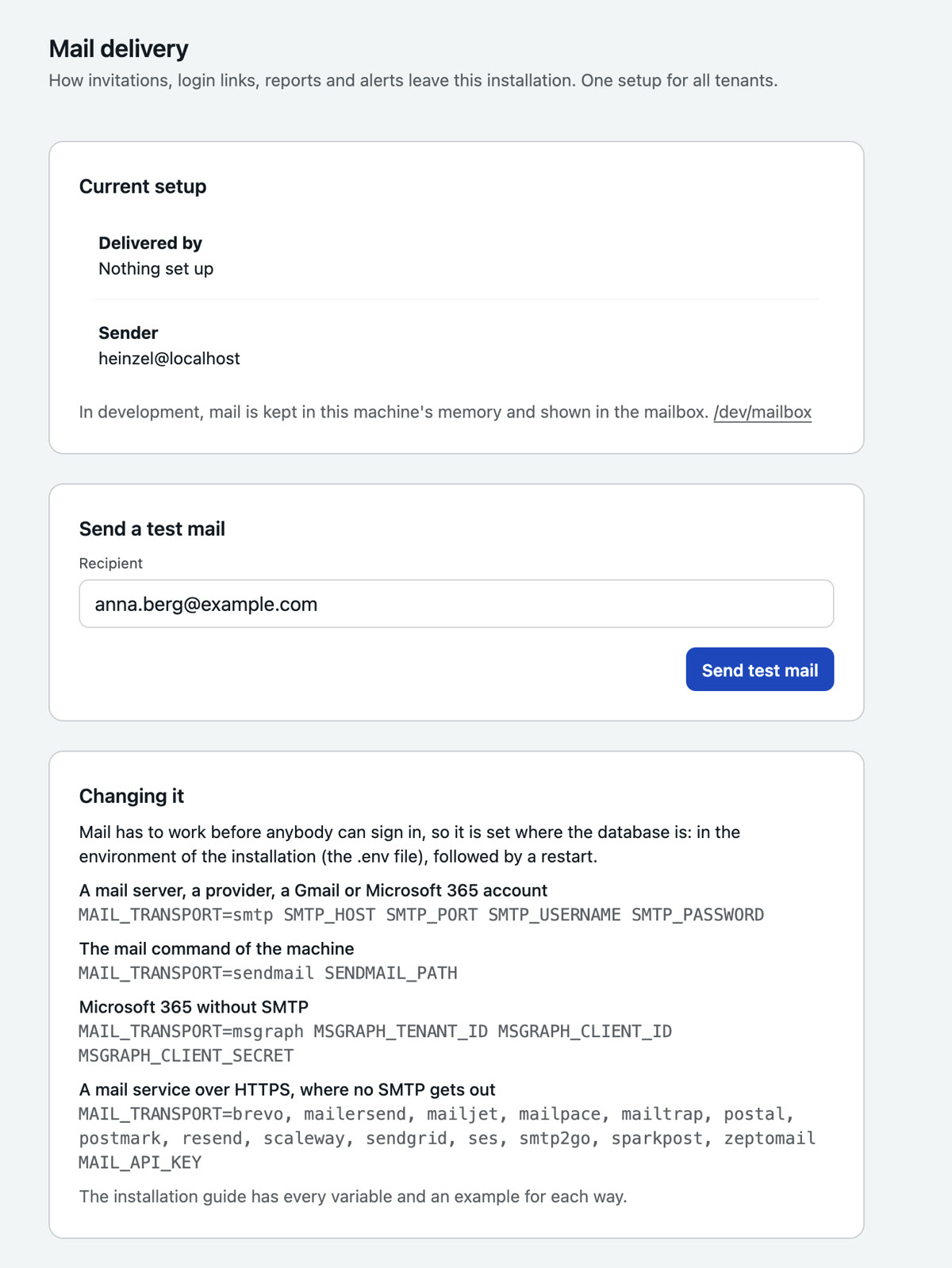
.env, followed by a restart; here you check it.
The test mail works from the shell too: sudo docker compose run --rm app bin/heinzel_pro eval 'HeinzelPro.Release.test_mail("you@example.com")'
7. The license
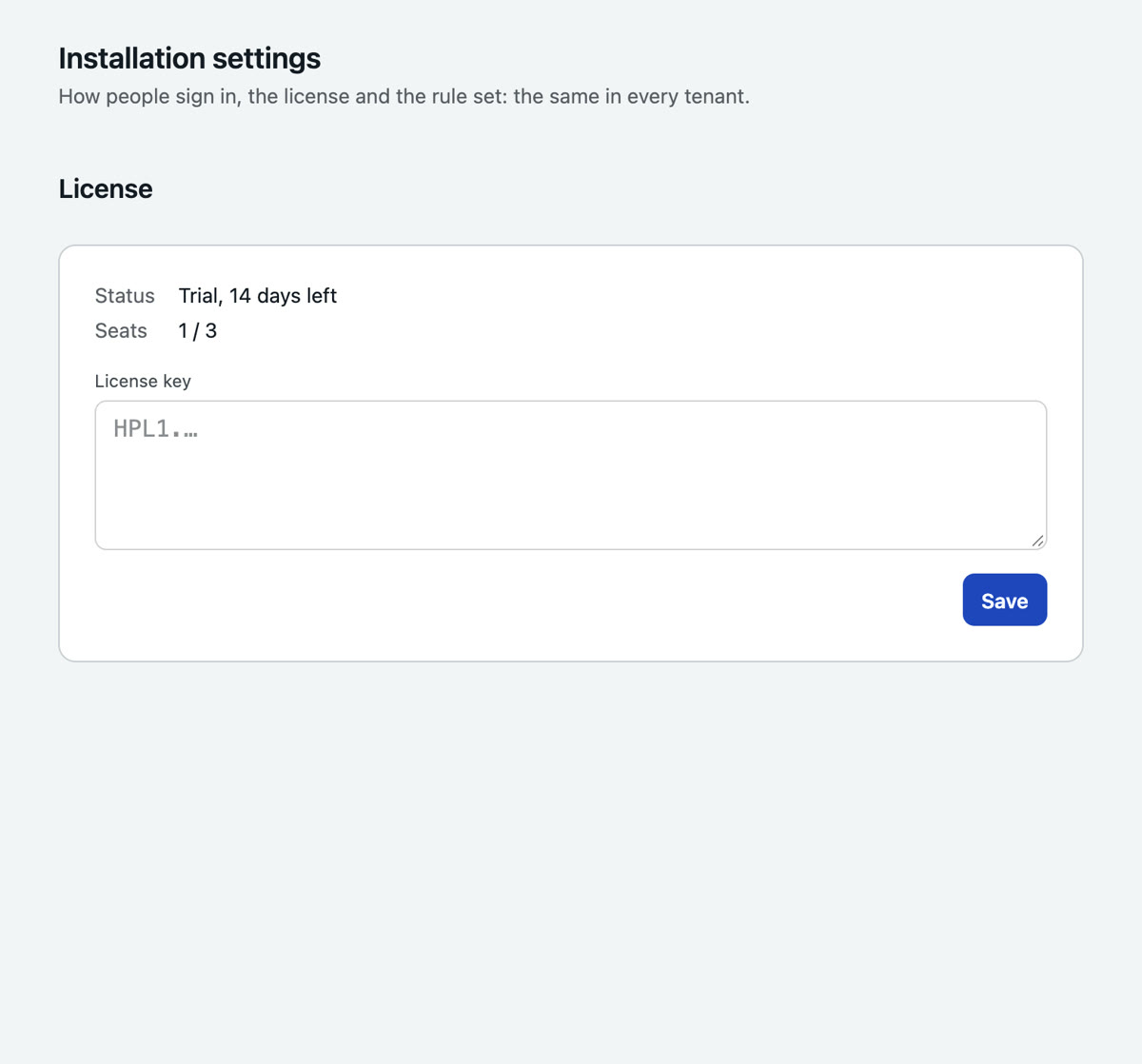
Without a key the installation runs for 14 days as a trial with three seats. The key you get from us goes in under Installation, Settings, License. It is verified offline and sent nowhere. A seat is every user who can act; rights to look are free. After a key expires there are 14 days of grace with a banner, after that no new sessions start, and everything recorded stays readable.
8. And then
Enter the model provider, add the first server, the first session: Getting started, from section 3. Looking after the installation, backup first of all, is under Operations.
Checklist
/opt/heinzel-pro/.envhas mode 600, and a copy lies with the database backup.curl -s http://127.0.0.1:4000/healthnames the version and"pending_migrations":0.https://heinzel.example.comopens the sign-in page, and the lock in the browser is closed.- A page stays connected: after a minute on the dashboard there is no banner about a lost connection.
curl -s http://heinzel.example.comanswers with a redirect to https.https://heinzel.example.com/ops/drainanswers with 404 from outside.- The test mail has arrived.
- Port 4000 is closed from outside:
nc -zv heinzel.example.com 4000from another machine fails. ss -lunshows the UDP ports 51900 to 51919 held by Docker, and the firewall lets them through; orHEINZEL_VPN_PORTS=nonestands in the.env.- The first backup has run (see Operations, Backup).
Variants
With your own PostgreSQL
Where the data centre already runs and backs up a PostgreSQL (version 15 or later), use that and leave out the service db. A role and a database it owns, nothing more, no superuser:
CREATE ROLE heinzel_pro LOGIN PASSWORD '…';
CREATE DATABASE heinzel_pro OWNER heinzel_pro;
In the .env, POSTGRES_PASSWORD goes; instead DATABASE_URL=ecto://heinzel_pro@db.example.com/heinzel_pro, DATABASE_PASSWORD and, for TLS to the database, DATABASE_SSL=true. In the compose file remove the service db, the depends_on and the three lines under environment. POOL_SIZE (default 10) is one container's connections.
Kubernetes
A Deployment with the image, the .env as a Secret, PostgreSQL as a service of the cluster. GET /health is the readiness probe. As preStop hook call /ops/drain (see Upgrade, Announcing a restart) and give the pod a terminationGracePeriodSeconds above the announced time. The VPN ports need a Service of type LoadBalancer or a hostPort.
Without a way to the internet
An installation without internet runs with a model inside your own network (Ollama, vLLM, LM Studio) and gets the rule set as a file: the .tar.gz of a tag of the public Heinzel repository, uploaded under Installation, Settings, Rule set. Mail goes to your own server. Nothing else changes; Heinzel Pro calls nothing of its own accord that you did not enter (the list is under Operations).
All environment variables
| Variable | Purpose |
|---|---|
PHX_HOST, HEINZEL_BASE_URL | The public address; PHX_SCHEME and PHX_PUBLIC_PORT where it differs from https and 443. |
SECRET_KEY_BASE | Signs cookies and tokens. |
HEINZEL_VAULT_KEY, HEINZEL_VAULT_KEY_ID | Encryption of stored secrets; rotation see Operations. |
HEINZEL_VERSION | The version that runs. Required. |
DATABASE_URL, DATABASE_PASSWORD, DATABASE_SSL | ecto://user@host/db plus password; true for TLS to the database. The compose file sets the first two for the bundled PostgreSQL. |
POOL_SIZE | Database connections, default 10. |
FORCE_SSL | Redirect to https behind a proxy that sets X-Forwarded-Proto. Requests on localhost stay plain, for the health check. |
TRUSTED_PROXIES | How many proxies of your own stand in front (default 1 with FORCE_SSL, else 0). Sign-in limit and audit log take the client's address from the entry of X-Forwarded-For that many places from the end. |
EXTRA_ORIGINS | Further allowed WebSocket origins, comma separated. |
HEINZEL_PORT | Where the application listens on the host, default 127.0.0.1:4000. |
MAIL_TRANSPORT, MAIL_FROM, MAIL_FROM_NAME, SMTP_*, MAIL_API_*, MSGRAPH_*, SENDMAIL_* | How mail leaves the house, see step 2. SMTP_HELO is the name the installation announces itself with, default PHX_HOST. |
HEINZEL_VPN_PORTS, HEINZEL_VPN_HOST | UDP ports for VPN connections (default 51900-51919, none for none) and the name the other side dials. |
HEINZEL_OPS_TOKEN | What the host shows to announce a restart. Without it the address does not exist. |
HEINZEL_RULES_DIR | A mounted directory as the rule set, above everything in the database; the rule set page then offers no update. |
HEINZEL_LICENSE_PUBLIC_KEY | Only if you issue licenses of your own. |
HEINZEL_HOSTED, HEINZEL_REFUSED_NETWORKS | For an installation that hosts tenants it does not know: refuses addresses that lead back to the installation itself, and the named networks. Do not set on your own premises. |
HEINZEL_SKIP_MIGRATIONS | 1 to start without migrations. |
LOG_LEVEL | debug, info, warning, error. |
HEINZEL_NODE_ID, HEINZEL_NODE_ADDRESS, HEINZEL_CLUSTER_NODES, HEINZEL_CLUSTER_COOKIE, HEINZEL_DIST_PORT, HEINZEL_LISTEN | Only for two slots, see Upgrade. |
When something snags
| What you see | Why | What to do |
|---|---|---|
docker compose up says "Set HEINZEL_VERSION in .env to the version to run" | The line is missing. Compose takes no latest on purpose. | HEINZEL_VERSION=2.68.2 into the .env, start again. |
| The container keeps restarting; the log names a UDP port | Something on the host already listens on a port between 51900 and 51919. | ss -lun shows what. Choose another range (HEINZEL_VPN_PORTS=51920-51939) or none and remove the UDP line. |
The start aborts with a line that names SMTP_ or MAIL_ | The mail setup is half done: a user without a password, a service without a key. | Fill the named variable or remove the way entirely. |
/health does not answer with 200 or shows pending_migrations above 0 | The database is not there yet, or the migrations are still running. | Wait a minute. Then docker compose logs app and docker compose ps: is db "healthy"? |
| The page loads, but after seconds a banner says the connection was lost, and forms do not react | The proxy does not pass WebSockets through, or the name in the browser is not the one in HEINZEL_BASE_URL. | Set the Upgrade and Connection headers as above. Put a second name into EXTRA_ORIGINS. |
| The browser reports too many redirects | FORCE_SSL=true, but the proxy sends no X-Forwarded-Proto. | Set the header; without a proxy FORCE_SSL=false. |
| Sign-in counts every attempt against all users and locks early | Behind two proxies the application sees only the first one's address. | TRUSTED_PROXIES=2 |
/auth/register says registration is closed | An account exists already. | Sign in. If nobody knows the password: docker compose exec app bin/login-link admin@example.com makes a sign-in link that works for 15 minutes. |
| The test mail does not arrive | The provider rejects the sender, or the server does not take the connection. | docker compose logs app | grep -i mail names the server's answer. MAIL_FROM must be an address verified with the provider. |
| A VPN connection stays at "waiting for the other side" | The UDP ports are closed in the host's firewall, or the web address points at another machine. | Open the firewall; set HEINZEL_VPN_HOST if the host's name is a different one. |
If something stays stuck, write to support@heinzel-pro.de with the line from the log. In the Enterprise plan we accompany the first installation remotely.