Schedules, findings and rollouts
A schedule lets Heinzel look after your servers at fixed times, with nobody there. What it finds and may not fix alone becomes a finding. And a task that is to do the same on many servers is a rollout: one first, then all.
Creating a schedule
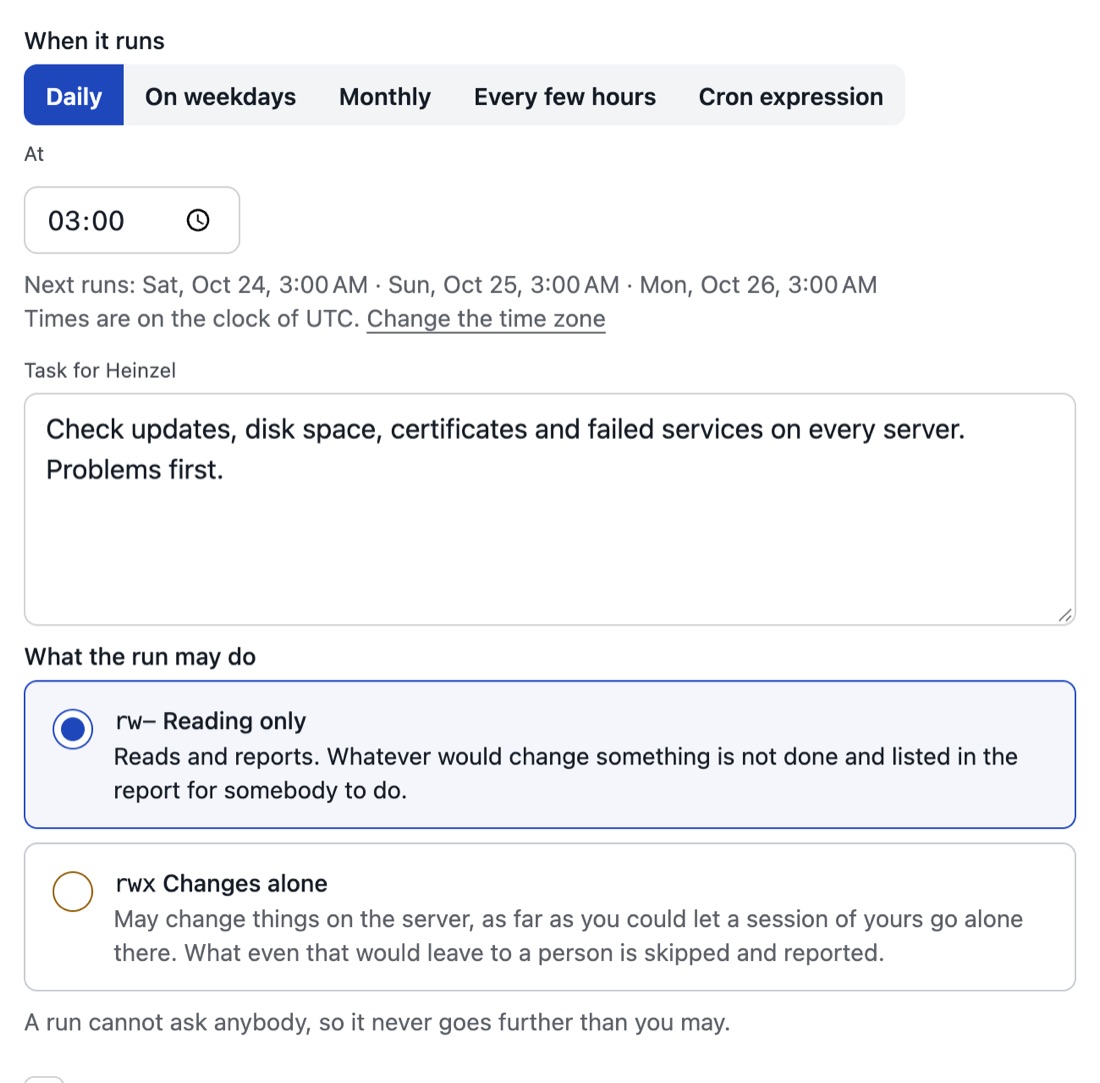
| Field | Meaning | Example |
|---|---|---|
| Where | A server group, a single server, or tags: then every server that carries all of them, a later tagged one too. Blocked servers are left out. | Group "Web", or env:prod role:web |
| One session or one per server | One session for all when the servers belong together; one per server, four at a time, when each is checked on its own. | one per server |
| When | Daily at a time, weekly, or a cron expression. In the tenant's time zone (Settings, General); a new tenant stands on UTC. | 0 3 * * * |
| Task | As in a session, only with nobody to ask back: say what is to be left alone. | see below |
| Level | rw- reads only. rwx changes, as far as the tenant's ceiling, the owner's rights and every server's ceiling allow, checked anew for every command. | rwx |
| Login | The user Heinzel works as on every server; a server without that login is left out. | heinzel |
| Report to | Mail addresses, and the team's channel where the tenant has a webhook. | admins@example.com |
The example's task:
Input: Install the pending security updates on all servers and check afterwards that every service is running. Whatever a server's journal excludes, leave in place and report it. No reboot.
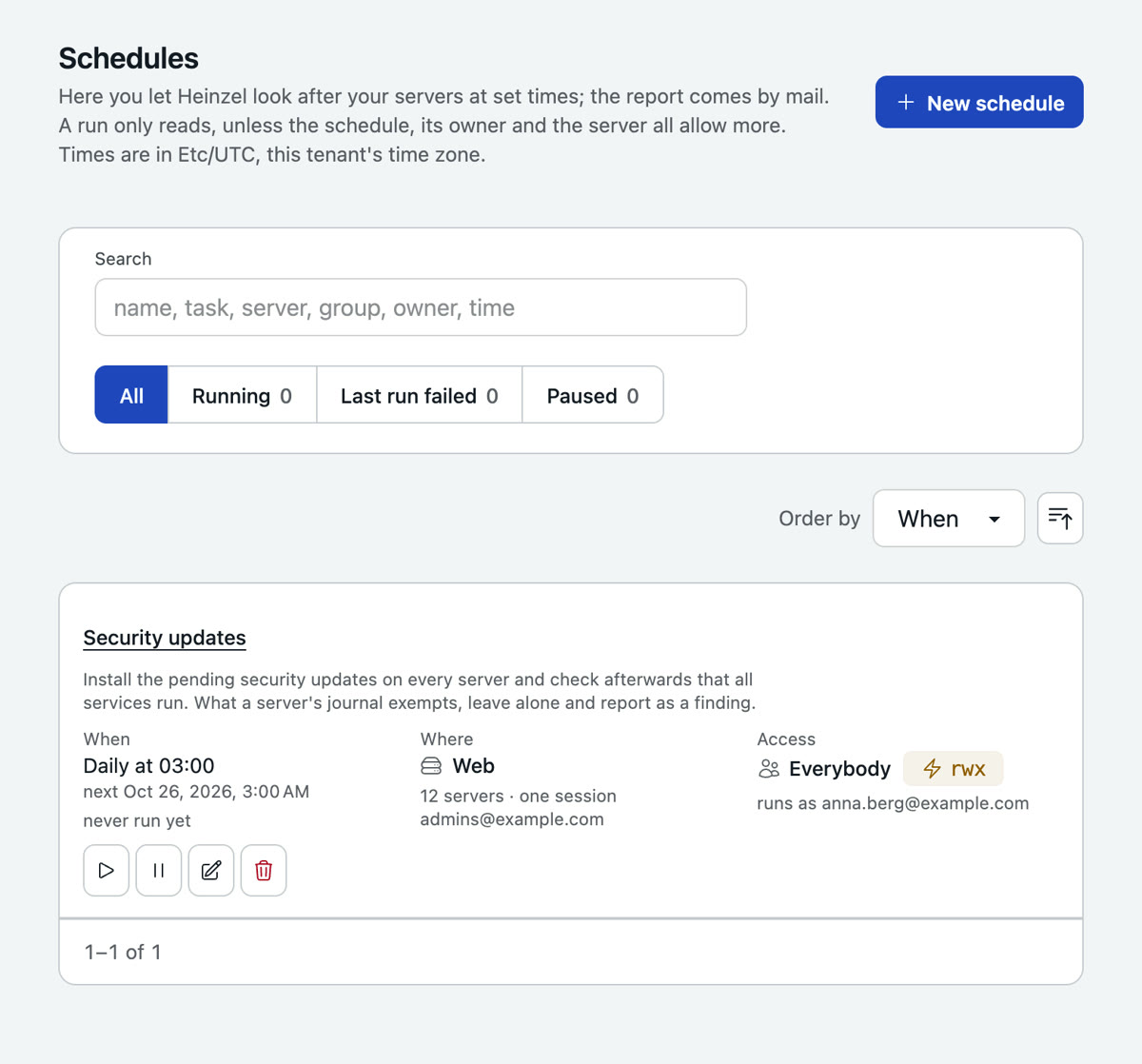
Whoever changes level, task or model becomes the schedule's owner; it runs in that person's name and as far as a session of theirs could go alone. A schedule belongs to a group, a person or everybody; the people of that group change, pause and start it. "Run now" in the list starts it at once.
What happens at night
A run is an unattended session per server, and it can ask nobody. Reading commands run. Changes run where the schedule stands on rwx and tenant, owner and server allow it. Everything else is skipped, named in the report under "Needs an operator" and kept for a week on the Approvals page, where somebody takes it over into a session of their own. A server group can carry a maintenance window (weekdays, from, until); outside it a run only reads.
In the morning a mail, as text and as HTML: first the hosts that need somebody, then one line per host where everything is in order.
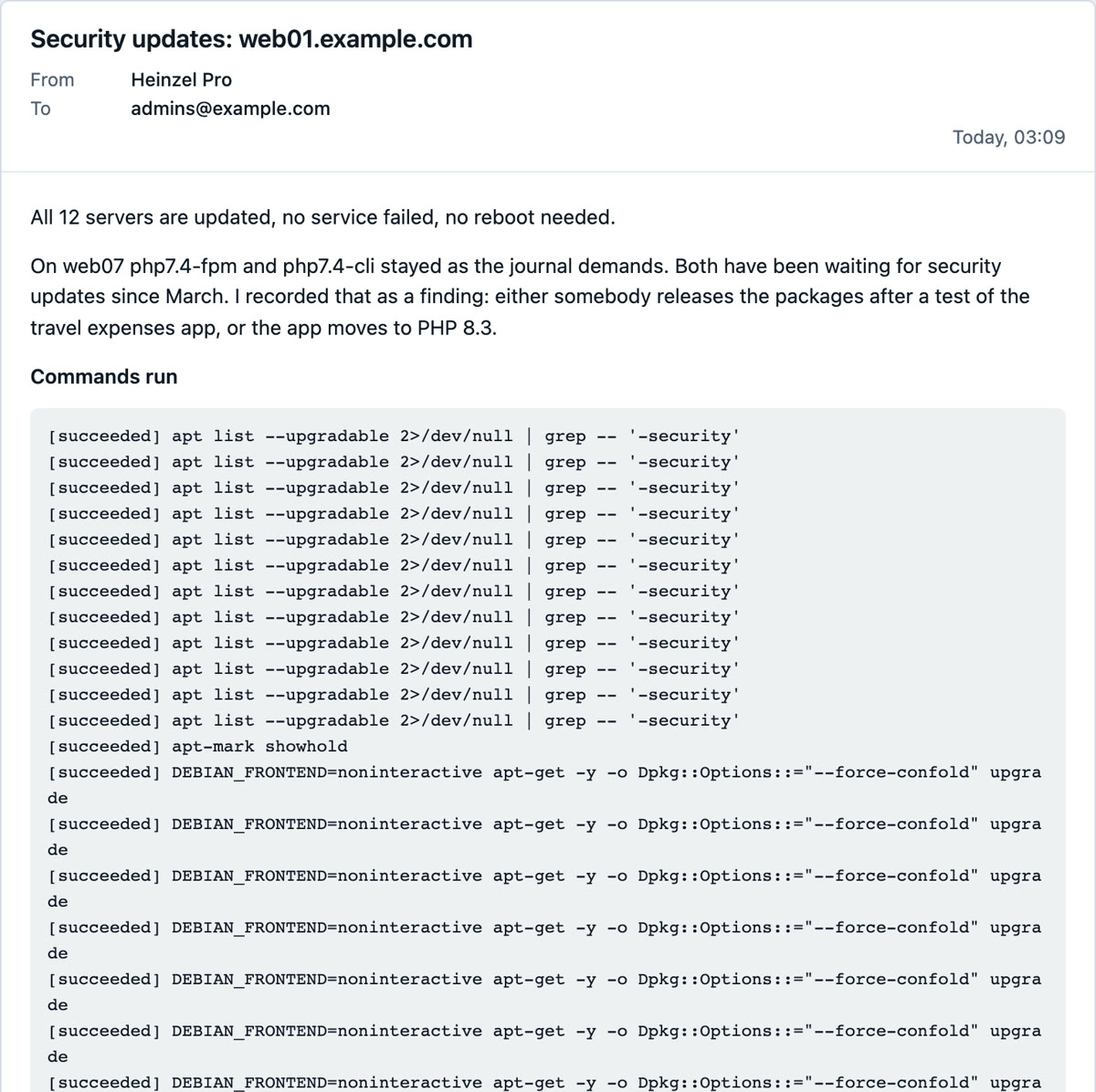
The whole example with screens from the night: Security updates every night.
Findings
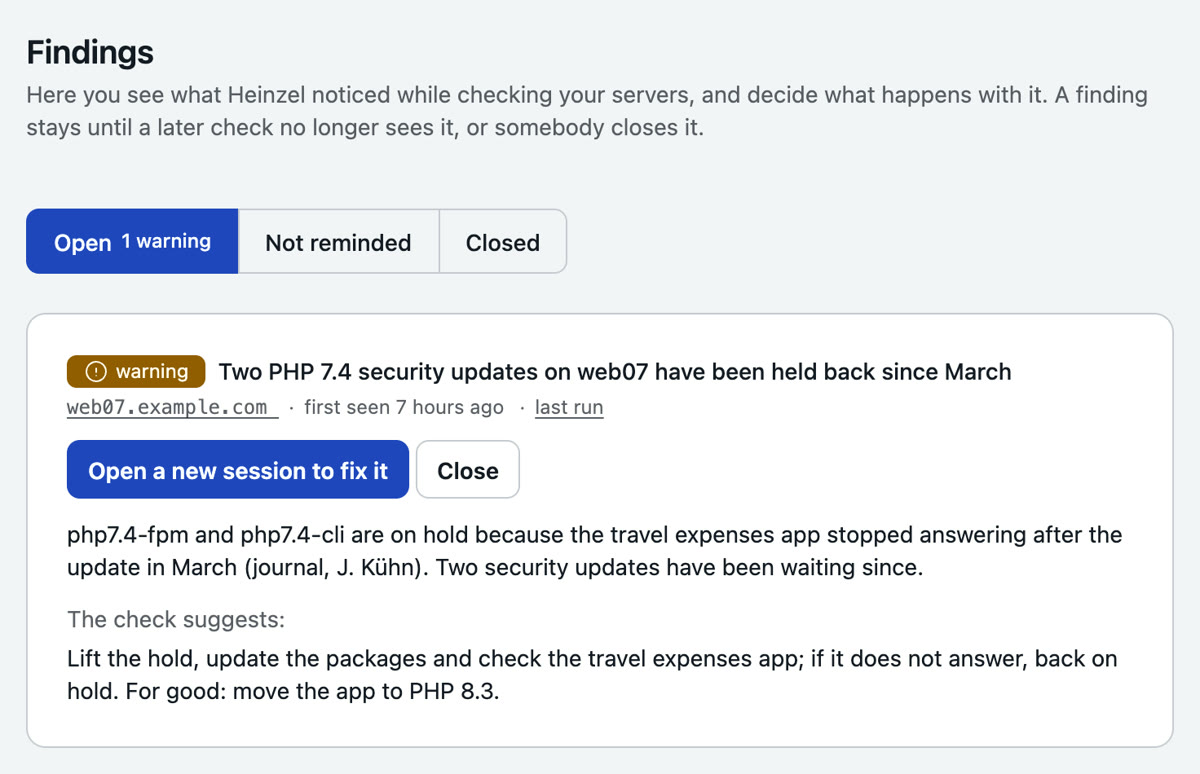
What a run found to be a problem stands under Findings: one entry per server and problem. Seen again the next night, it stays one entry with a counter; if a later run of the same schedule no longer sees it, it closes by itself. You take a finding over, close it by hand or start a session from it: the proposed task is already in the form, read it before you start.
Rollouts: the same on many servers
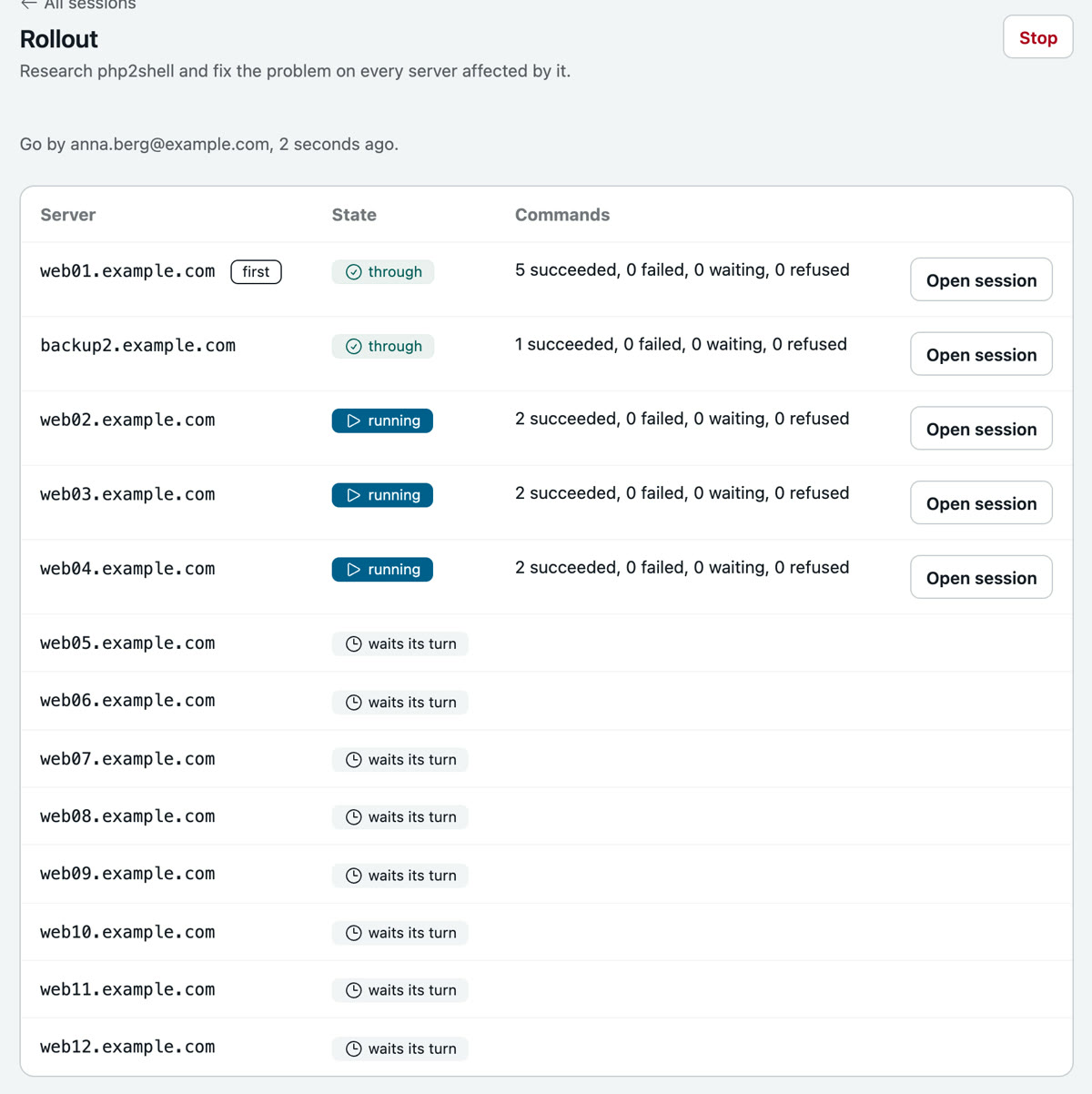
New session, "The same on all in parallel": tick the servers, by hand or by tag, write the task once. The rollout first runs on the first server as an ordinary session with every approval it needs. Once it is through, somebody who may approve reads that session and says Go. Then the task runs on the others, four at a time.
On the other servers only those commands run without asking that a person approved on the first and that succeeded there, none of them irreversible, as the same text and in the same order, each only once the one before succeeded. Everything else asks as always. Every server keeps its own session, its own record and its own stop button.
Alerts from the monitoring
Let your monitoring send an alert to Heinzel Pro, and Heinzel looks at once: under Settings, Integrations you generate a token; the monitoring sends it as a bearer token to /api/alerts/<tenant>. Alertmanager's webhook is accepted as it is; any other system sends JSON with host, title and text.
$ curl -X POST https://app.heinzel-pro.de/api/alerts/example \
  -H "Authorization: Bearer $HEINZEL_ALERT_TOKEN" \
  -H "Content-Type: application/json" \
  -d '{"host": "web03.example.com",
       "title": "Disk /var 92 % full",
       "text": "Threshold 90 % exceeded for 10 minutes"}'
If the host is one of your servers, a session starts there that only reads and reports cause and proposed fix; the answer to the call holds the session's address. The same alert finds its session again within an hour, and at most twenty sessions start per hour. The other way round, Heinzel Pro marks changes in the monitoring: with an endpoint that takes annotations like Grafana, every executed command appears in the graphs.
What notifies you
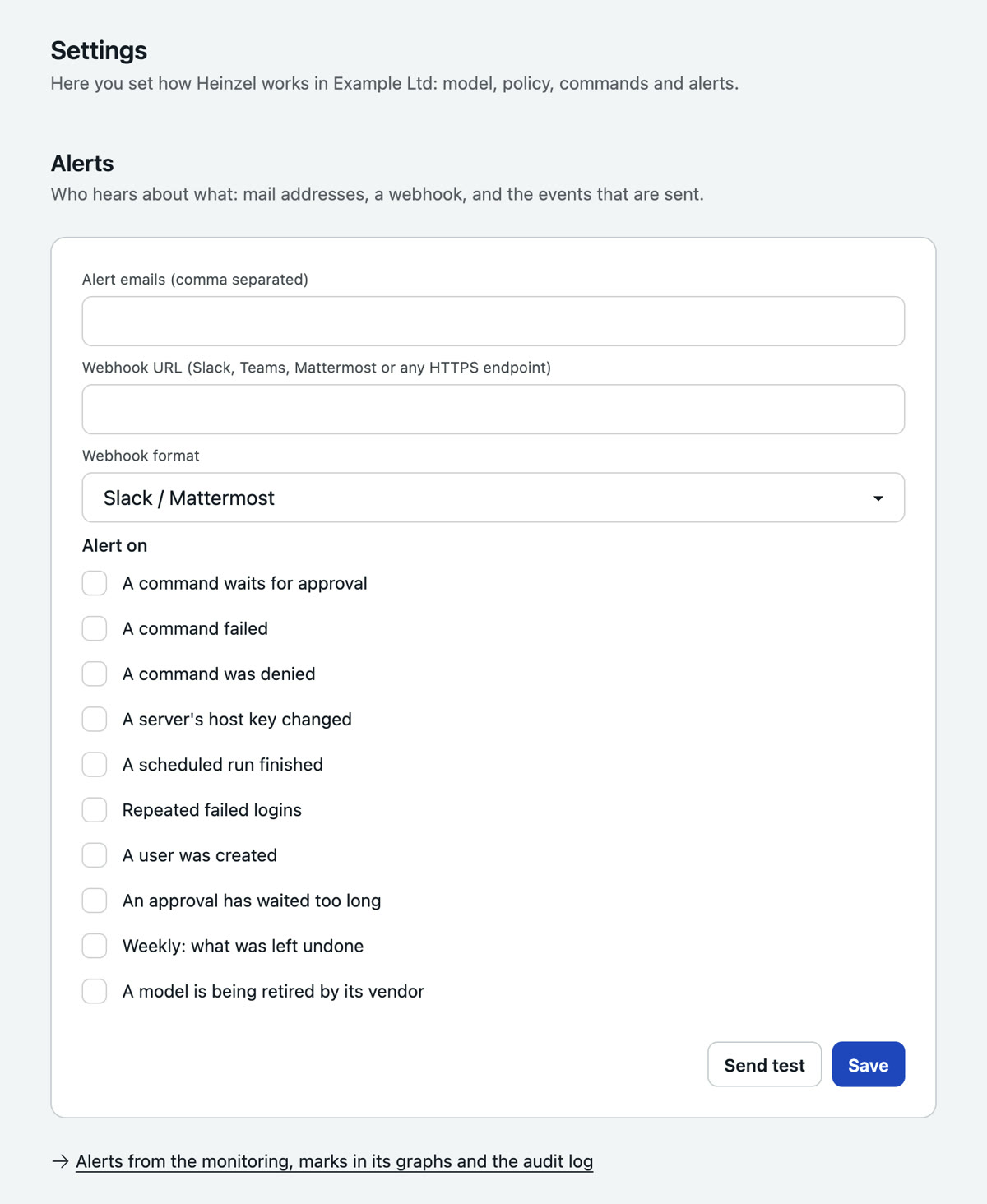
Under Settings, Alerts: mail addresses and a webhook (Slack, Teams, Mattermost, generic JSON), and a box per event: approval needed, command failed or denied, host key changed, scheduled run finished, repeated failed sign-ins, user created, an approval waiting too long, a model the provider retires, and a weekly mail of what was left undone. Events an upgrade brings are off until you switch them on.
The API
A pipeline that has Heinzel check a deployment, a script that creates servers, a report fetched every morning: under Administration, API tokens an administrator generates a token with the scopes read, sessions and servers. It acts in the name of the person who created it and never may more than they. And it never approves a command: it sees what waits, and it can deny; an approval is a person in the browser.
# Start a session
$ curl -X POST https://app.heinzel-pro.de/api/v1/example/sessions \
  -H "Authorization: Bearer hzp_…" \
  -H "Content-Type: application/json" \
  -d '{"server": "web03.example.com",
       "task": "Check why nginx has been returning 502 since the deploy at 14:02"}'

# Read its state and the last answer
$ curl -H "Authorization: Bearer hzp_…" \
  https://app.heinzel-pro.de/api/v1/example/sessions/0199e2c4-…

# The change record as Markdown
$ curl -H "Authorization: Bearer hzp_…" \
https://app.heinzel-pro.de/api/v1/example/sessions/0199e2c4-…/record| Call | Scope | What it does |
|---|---|---|
GET /servers | read | The servers with their logins. |
POST /servers | servers | Creates one; returns the public key to put on the host. |
GET /sessions, POST /sessions | read, sessions | The person's sessions; start one with server and task. |
GET /sessions/:id | read | State, last answer, summary, commands. |
POST /sessions/:id/messages | sessions | Writes text into a session. |
GET /sessions/:id/record | read | The change record as Markdown. |
GET /approvals, POST /approvals/:id/deny | read, sessions | What waits; deny a command, with a note. |
GET /findings | read | The open findings. |
GET /schedules, POST /schedules/:id/run | read, sessions | The schedules; run one now. |
An unknown tenant and a wrong token both get 401 with the same body; a call outside the scope 403; one that cannot be done as things stand (a session that is busy) 409. 120 calls per minute and address are the default. The script heinzel from the repository is a shell wrapper around these calls.