Sessions and approvals
A session is one task on one or more servers: you write what you need, Heinzel proposes commands, the code classifies each one, and depending on the level it runs at once or waits for you.
Starting a session
The form under New session asks four things.
| Field | What you choose |
|---|---|
| Server | One, preset to the one used last. Or several: as one session that reaches all of them (moving a database from db to standby), or as the same task on each, a rollout (see Rollouts). A session reaches only the servers it was started with; if it needs one more, it ends and offers a new one with the wider set. |
| Task | One to three sentences. What you want to know or what should be the case afterwards, plus what Heinzel has to know: the time, the customer, what must not happen. |
| Level | How far Heinzel goes on its own, see below. Preset to what the tenant's policy says, never more than you may do on the server. |
| Model | Only when several are open to you. Plus the effort (default, or a level the model offers). |
Three good tasks
Input: On web03 customers have been getting sporadic 502s since 2 pm. Find the cause. Restart nothing before you have told me what it is.
Input: Create the user "monitoring" on db1 and db2 with read-only rights on all databases, password from the secret MONITORING_DB.
Input: The certificate on mail01 expires in 9 days and certbot has failed to renew it three times. Why, and put it right.
What the three share: a server or two, a goal, and the limit Heinzel has to know. A task like "tidy up a bit" gets a question back instead of a command.
The three levels
Every session chooses at its start how far Heinzel goes on its own. The interface writes the levels like the permissions of a file.
| Level | Runs without approval | What for |
|---|---|---|
| Every command waits | nothing, not even reading | A server where you want to see every move, such as the first contact with an unfamiliar system. |
rw- Asks before changes | commands that only read | Daily work. Heinzel reads on its own, finds, explains, and every change waits for you. |
rwx Changes alone | what the tenant's matrix runs at once, by default everything but identities | Schedules at night, rollouts, routine on servers whose outage you can bear. |
For every command the lowest of four limits counts:
- The tenant's ceiling, set by the installation (
rw-orrwx). - The person's letters on this server, from their teams and groups.
- The server's ceiling, that of its groups and of the login used.
- The session's choice.
Example: Anna has rwx on the group Web through her team. The server web07 carries the ceiling rw-, because the customer looks after it too. If Anna starts a session there on "Changes alone", every change still goes through an approval. The session says so when it starts.
The command card
Every command Heinzel proposes appears as a card with four parts.
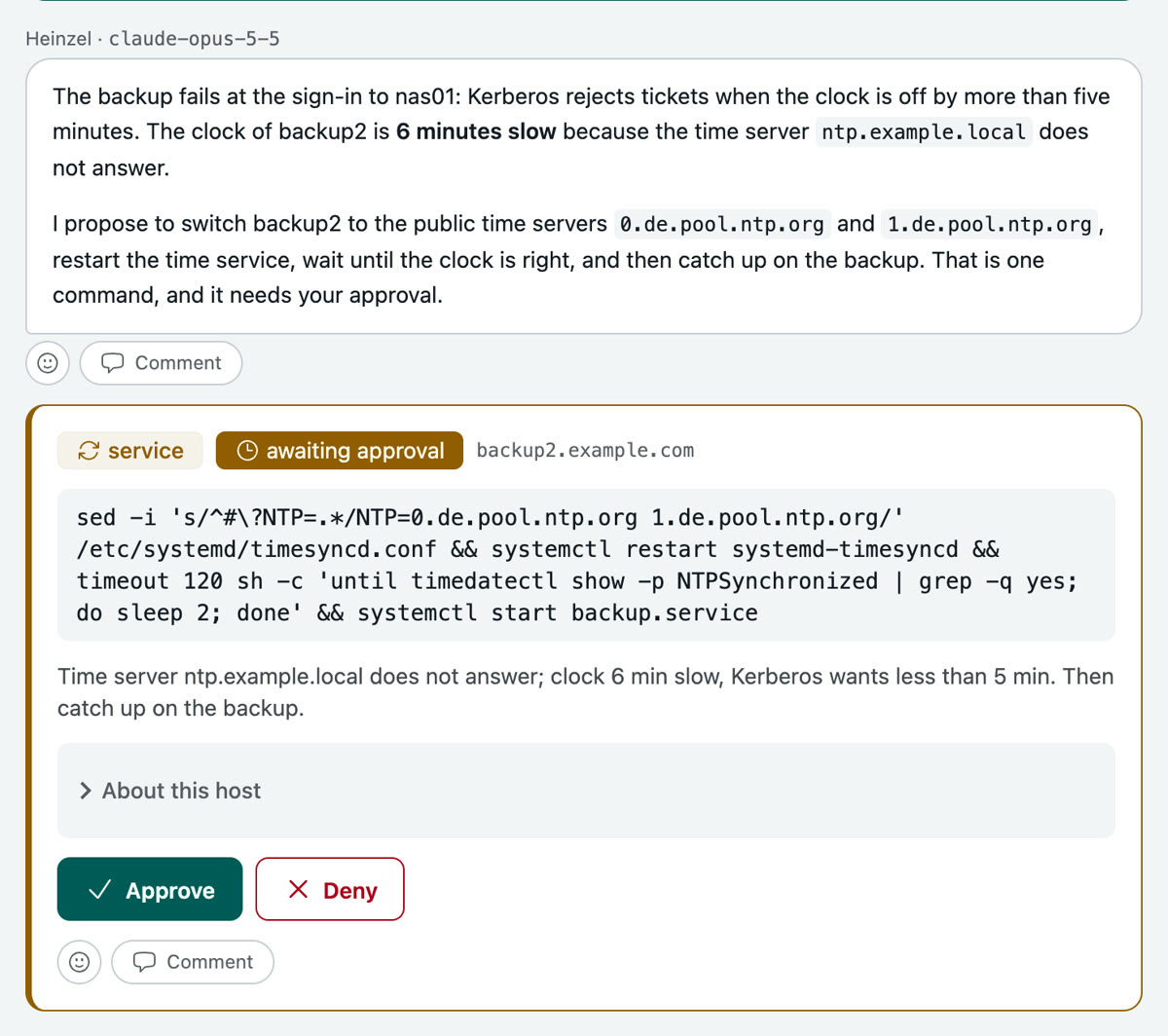
The class
It comes from the code, not from the model: Heinzel Pro takes the command apart (pipes, &&, sudo, sh -c) and takes the highest class of its parts. What the code cannot read counts as writing. What a class then does on rw- and on rwx is set by the tenant in the matrix (Settings, Policy); the right-hand column shows the default.
| Class | Example | Default on rw- |
|---|---|---|
| read-only | systemctl status nginx, df -h, tail -n 50 /var/log/syslog | runs at once |
| writing | sed -i … /etc/hosts, mkdir, chmod | waits for a person |
| package | apt-get install, dnf update, pkg upgrade | waits for a person |
| service | systemctl restart, service … reload | waits for a person |
| firewall | ufw allow, nft, pfctl | waits, with a rollback timer |
| identity | useradd, passwd, changes to sudoers or authorized_keys | waits for two people, on every level; never runs unattended |
| reboot | reboot, shutdown -r | waits for a person |
| irreversible | rm -rf /var/lib/…, mkfs, DROP DATABASE, userdel | waits for two people |
| blocked | dd if=/dev/zero of=/dev/sda, writing to /etc/heinzel.conf, everything on the block list | never runs |
Approve or deny
Approve lets exactly this command run once on this server. Deny takes a reason along, which Heinzel reads: "Not now, the customer is running a load test until 6 pm" brings the proposal to carry on after six, or a way without a restart. A denial is final; Heinzel may not propose the same command again in other words.
Where the matrix asks for two people, the second approval comes from another person with the right to it, and their sign-in may be at most five minutes old. Who approved stands on the command and in the audit log.
A change that could lock Heinzel out
Before a change to an address, a route or the firewall, Heinzel sets a timer on the server that restores the old state after two minutes, in the same command as the change. Then it signs in afresh and stops the timer. If the new login fails, the server takes the change back by itself. The card says so.
The Approvals page
Waiting commands of all sessions you may decide on, in one place. The same change on many servers you approve here at once. Beside them stands, for a week, what nightly runs skipped because they were not allowed to do it alone, to be taken over into a session of your own.
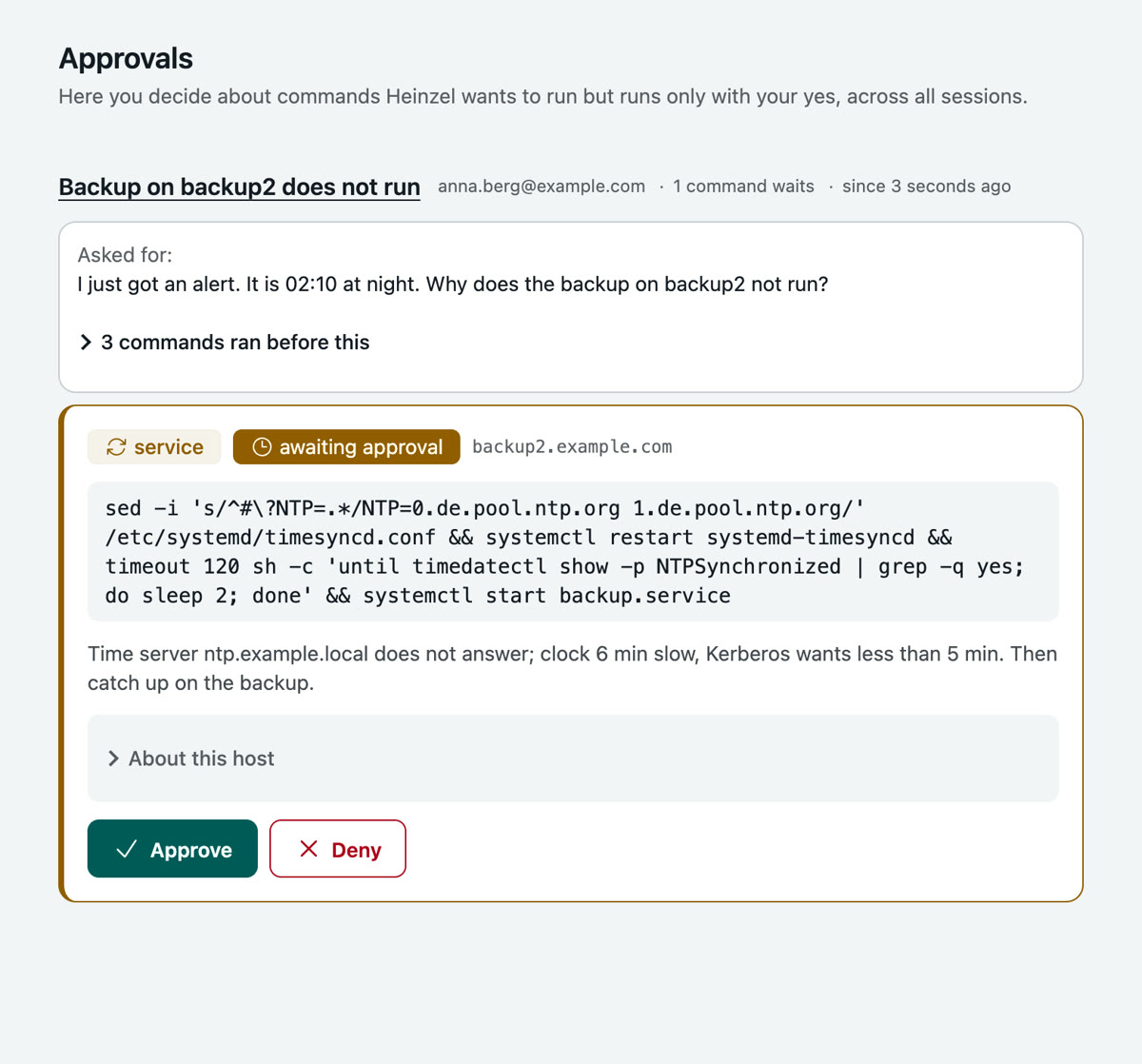
So that you miss nothing without keeping the page open:
- The navigation counts what your sessions need; the browser tab carries the number in its title.
- A session's tab begins with "● Approval needed", "● Failed", "● Stopped" or "● Answer ready", and with "…" while Heinzel works.
- "Notify in this browser" on the Sessions page: a notification, from another window too.
- Mail or webhook, if the tenant has switched on the event "approval needed" under Settings, Alerts. An approval that waits too long can be escalated (Settings, Policy).
Plans
If a task needs three or more changing commands, Heinzel first presents a plan: the goal, every step with its exact command, what can go wrong and how to undo it. You approve it as a whole or deny it.
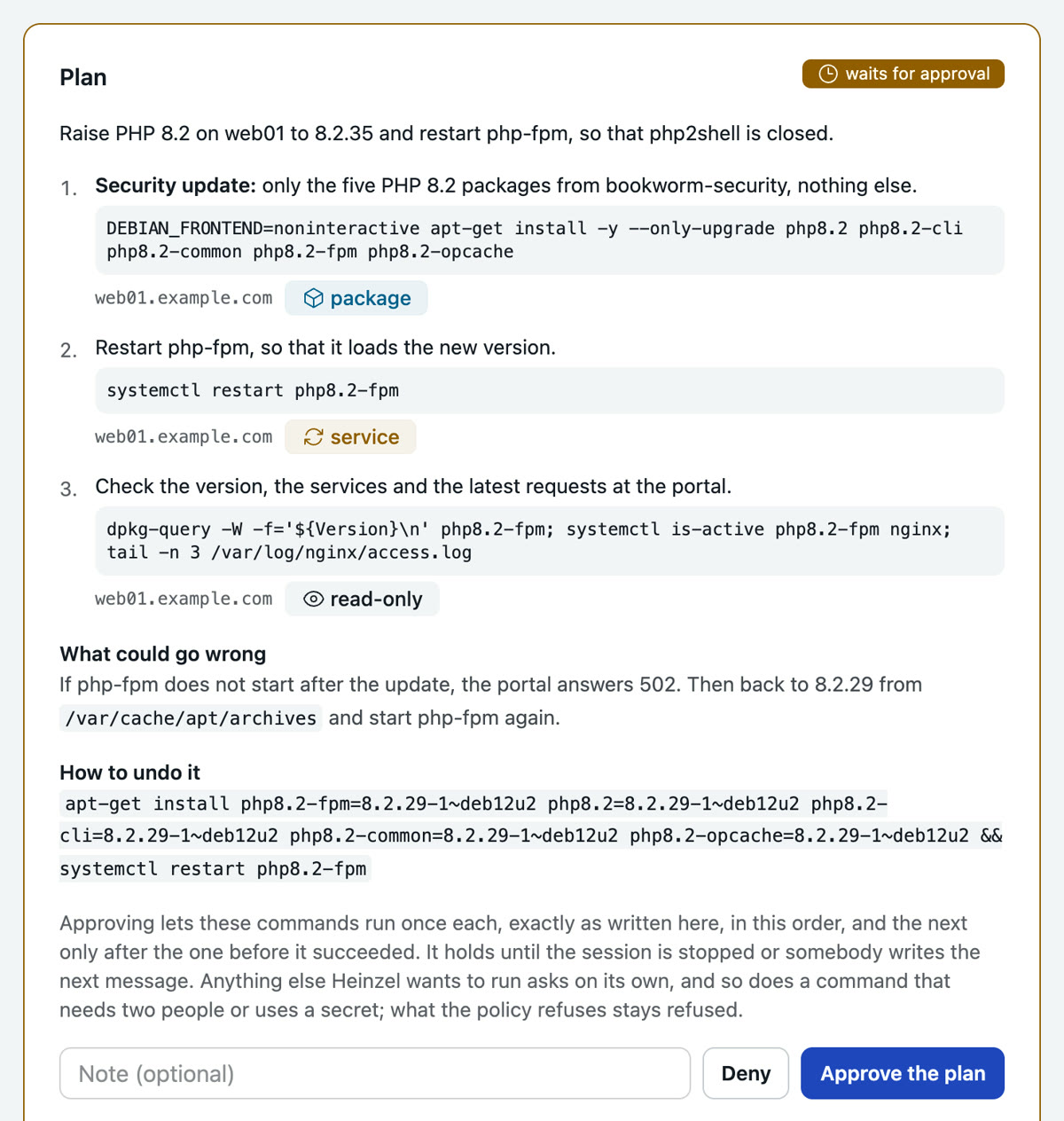
An approved step lets exactly that command run once, in the plan's order, the next only when the one before succeeded. A command that differs by one character asks on its own. So does one that needs two people, names a secret or changes a file. A stop or your next message ends the plan.
File changes
When Heinzel changes a configuration file, the card shows the difference as a diff. A file change always asks on its own; no plan and no standing approval replaces that. Before writing, Heinzel Pro checks that the file is still the one the diff was shown against, and refuses otherwise. The old file stays beside it as <file>.heinzel-<time>.bak.
Files that Ansible, Terraform or another tool writes you enter under Managed files, such as /etc/nginx/**; a change there is refused with the note where it belongs instead. A file whose first lines say "Ansible managed" is refused even without an entry.
Secrets
A password or token a command needs is stored by administrators under Secrets. Heinzel uses it as $HEINZEL_SECRET_NAME; the value never goes to the model, reaches the command on its standard input and is redacted in the output. A command that names a secret waits for a person on every level. Read it before you approve: a command can pass a value on in another form.
# What Heinzel's proposal looks like when MONITORING_DB is stored
psql -c "CREATE ROLE monitoring LOGIN PASSWORD '$HEINZEL_SECRET_MONITORING_DB'"
Several sessions side by side
Start the next while the first one reads. The list under Sessions and the strip beside an open session say what each is doing.
| State | Meaning |
|---|---|
| needs you | waits for an approval, has failed or was interrupted |
| answered | Heinzel is done, and you have not read it yet |
| working | Heinzel is at it |
| ready | nothing open |
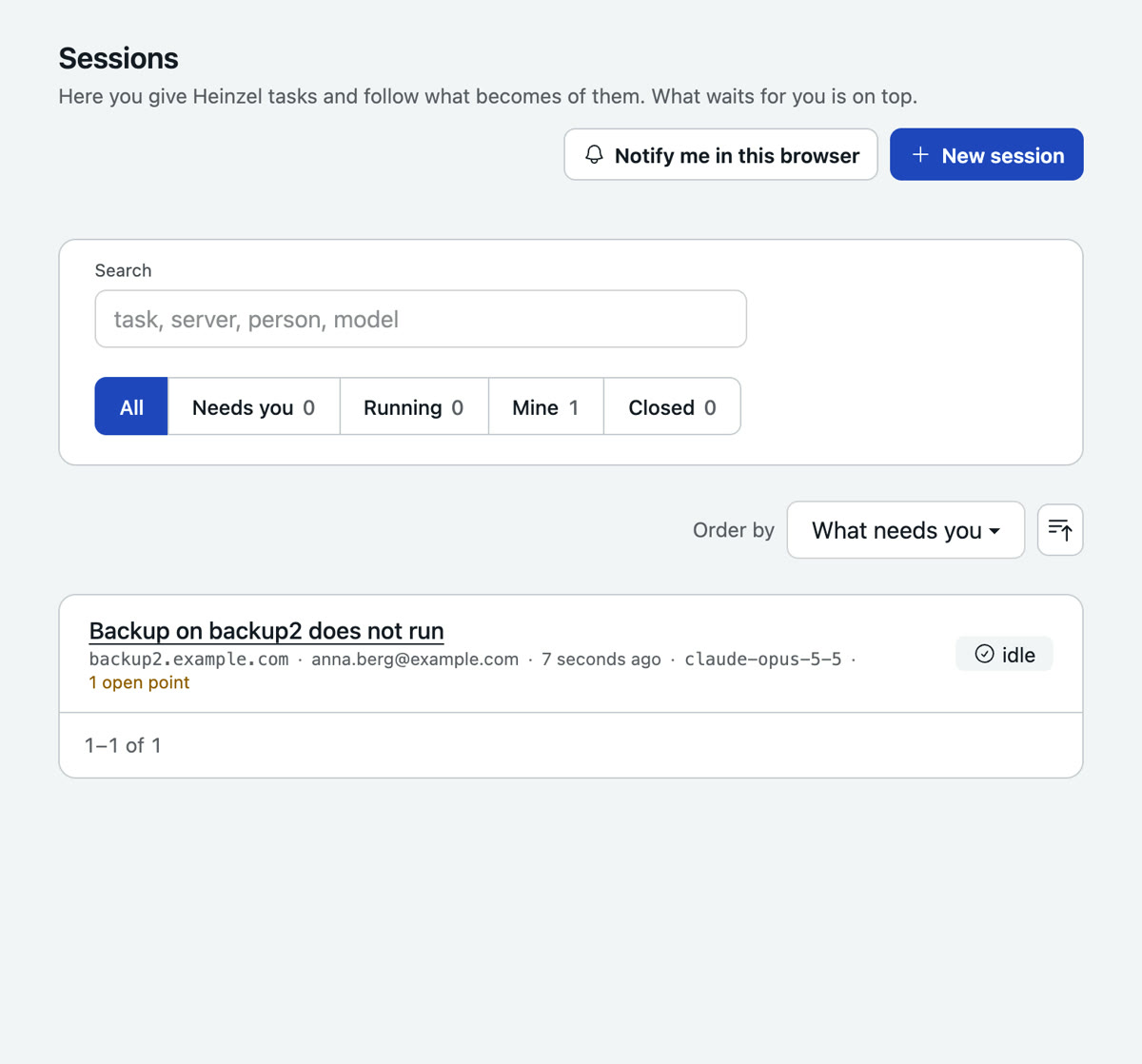
Long sessions keep going: the page shows how much of the model's room a session has used, and past the budget the provider sums up the earlier messages for the model while the session keeps every message in full.
When the task is done
Heinzel writes the summary at the top of the session: changes, checks, open points, the way back. It is the model's own account and not checked against what ran; the evidence is the record of the commands. Open points go onto the server's to-do, and a note goes into the server's journal and, where the server allows it, as a handover note into its system journal (journalctl -t heinzel).
A session whose task is done closes by itself after three quiet hours, otherwise after the tenant's hours without activity. Work goes on in a new session that reads the old one's summary. Under More on the session page:
- Change record: a Markdown file with who asked, who decided, the outcome of every command and its place in the audit chain. For the ticket or the auditor.
- Incident draft: the same facts as a timeline, the sections for people (impact, cause, what to change) marked TODO. No model writes it.
- Roll back: puts the undo notes of every command, newest first, into the task of a new session. The button itself undoes nothing; every step is proposed and approved like any other command.
- Report and messages: where this session's report goes, see below.
- Reload rules, as soon as a newer rule set applies; a session otherwise keeps the one it started with.
Sharing
A session belongs to whoever started it. Under People in the session the owner opens it to everybody in the tenant, to groups and people, each to read or to write, or to people without an account through a link that ends after 1, 7 or 30 days. Links are allowed by an administrator under Settings, Policy; they are off at first. Writing means sending messages: a colleague carries on where you stopped, every message carries its sender, and a turn runs with the lesser rights of both. With Take over an administrator or somebody named in the session becomes its owner.
What new sessions are for everybody (private, readable, writable) is set by the policy; every member sets a default of their own under Sessions, Sharing, such as "private, and the group on-call may write".
Reports and messages
A session sends its report to the destinations on its page: mail addresses and the team's channel (the tenant's webhook: Slack, Teams, Mattermost). It goes out by itself when Heinzel has finished a task and written the summary, and when the session fails. Under Account, "Reports of my sessions" sets the destinations every session of yours takes along.
Or you ask for it in the task:
Input: Check on all web servers that the certificate is valid for at least 20 more days, and then send me a mail to ops@example.com.
Heinzel writes only to destinations a person named: an address from a message of the session, the report destinations, the people of the session, the team's channel. An address it read on a host or in a file is refused. At most ten messages per session and hour, each freed of secrets, each in the audit log.
Attachments
The message field takes files through the paperclip, by dropping or pasting: text files up to 300 kB, and with an Anthropic model also images and PDFs up to 3.5 MB, five per message. A graph from the monitoring, a configuration file from the laptop, the screenshot of an error. A text that reads like instructions to Heinzel is kept from the model until somebody with write access lets it through.